
Lucky Vibe Casino App — the Android and iOS Reality
There is no Lucky Vibe Casino app on Google Play, nothing in Apple’s App Store, and no APK file that the operator itself hands out. The Lucky Vibe mobile casino in Australia is the browser build of the site, and it loads the same 5,000+ games, the same cashier and the same 24/7 live chat on a phone as it does on a laptop. The gap matters far less than most punters expect, and this page sets out the two or three places where it actually bites.
Open the mobile siteWhy there is no Lucky Vibe Casino app
Neither store treats real-money casino software as an ordinary app. Google Play accepts gambling apps only in a fixed list of countries, and the developer has to hold a licence issued by that country’s regulator and clear a separate application process before the listing goes live. Apple’s App Review Guidelines say much the same: real-money gaming apps must be submitted by the licensed operator, must be geo-restricted to the territory where that licence is valid, and must be free to download.
Australia is where this gets awkward. The Interactive Gambling Act 2001 allows domestic licensing for sports and race wagering, but not for online casino games. There is no Australian online casino licence for anyone to hold. Sportsbet and the TAB have store listings because their product can be licensed here; an offshore casino cannot file the same paperwork, because that paperwork does not exist.
Lucky Vibe runs on a Curaçao Gaming Control Board licence (OGL/2023/176/0095, Hollycorn N.V.). The licence is real and it is what the operator answers to, but neither Google nor Apple accepts it as grounds for an Australian store listing. There is no Lucky Vibe Casino Android build and no iOS build either, and the outcome is identical across almost every Curaçao-licensed brand aimed at Australian players: web only. The brand’s own answer to the app question is a single line about playing through your mobile browser, and five separate reviews of the casino reach the same conclusion.
A second reason gets less attention. Native builds mean two extra codebases and two review queues on top of the web version the operator already ships, while studios such as Pragmatic Play, Evolution and Play’n GO deliver their titles as HTML5 that runs in mobile Safari and Chrome with no wrapper. For a lobby carrying 5,000+ games from 70+ studios, an app would mostly be a shell around web content that already works. For the wider picture on the brand, our full Lucky Vibe Casino breakdown for Australia covers the licence, the payouts and the complaint history.
Add to Home Screen: the Lucky Vibe Casino app alternative
The home-screen shortcut is what most people actually want when they type “lucky vibe casino app” into Google. You get an icon on the home screen, and the casino opens without the address bar eating the top of the display. The session behaves exactly as it would in a tab. Setup takes under a minute on either platform and installs nothing at all.
On Android (Chrome)
- Open Chrome and go to the casino address directly. Do not use a link someone forwarded you in a message or a group chat; type it yourself or follow a link from a page you already trust.
- Sign in first if you have an account, so the shortcut lands on the lobby instead of the front page. If you are stuck at that step, the notes on signing in to your Lucky Vibe account cover the usual causes.
- Tap the three-dot menu at the top right of Chrome.
- Choose Add to Home screen. Recent Chrome builds tuck this under an “Add to” submenu, and on some devices it reads Install app instead. Both do the same thing here.
- Rename the shortcut if the page title is too long for a home-screen label, then confirm.
- Drag the icon wherever you keep it. Long-pressing it later and removing it deletes the shortcut only. Your account, balance and bonus progress are untouched.
On iPhone (Safari)
- Open the casino in Safari. Chrome for iOS can create a shortcut too, but Safari handles the full-screen behaviour more consistently on iOS 17 and later.
- Log in, so the saved page opens where you want it rather than on the promo splash.
- Tap the Share button, the square with the upward arrow in the bottom toolbar.
- Scroll the share sheet down past the sharing options until you reach Add to Home Screen.
- Edit the name if you want something shorter, then tap Add.
- The icon lands on your last home-screen page. Opening it hides Safari’s toolbars, which is as close to an app as this gets.
What you end up with is a bookmark wearing an app icon. It asks for no permissions and occupies a few kilobytes. One thing to know before you rely on it: clearing your browser data keeps the icon but wipes the logged-in session, so you will be typing your password again.
What you keep and what you lose
The comparison worth making is phone browser against desktop browser, and what separates the two is screen space and multitasking, not missing features. The table below covers the parts of the casino people actually use.
| Feature | Phone browser | Desktop |
|---|---|---|
| Full game library (5,000+ titles) | Yes, same catalogue | Yes |
| Cashier: deposits and withdrawals | Yes, full access | Yes |
| Live chat support | Yes, opens as an overlay on top of the game | Yes, as a side panel |
| Live dealer tables | Yes, portrait or landscape | Yes, larger stream and side bets easier to hit |
| Autoplay and turbo settings | Yes, inside each game’s own menu | Yes |
| Provider and category filters | Collapsed behind a menu icon | Visible on screen at all times |
| Push notifications | No | No |
| Several games open at once | Not practical, one tab at a time | Yes |
| Bonus and wagering progress | Yes, same account view | Yes |
| Offline play | No | No |
Nothing in the account itself is device-specific. Wagering on the four-deposit welcome package worth up to A$5,000 and 300 free spins ticks over at the same 40x rate whether you spin on a phone at the bus stop or on a desktop at home, and the three-day bonus clock does not pause because you switched screens.
Claim A$5,000 + 300 FSThe APK trap
Search for a Lucky Vibe Casino APK and you will find mirror hosts, “safe download” pages and YouTube clips walking through the install. None of them lead back to the operator’s own domain. That is the single check that settles it: an operator that genuinely ships an Android build hosts the file on its own site and says so on its mobile page. Lucky Vibe says the opposite.
Sideloading an unsigned casino APK carries three specific risks. The first is a repackaged build, where someone takes a legitimate web wrapper, injects code and re-signs it; once installed it can read whatever you type into its own screens, passwords and card details included. The second is a fake login screen that looks close enough to the real thing and quietly forwards your credentials. The third is duller but common: a sideloaded file has no update path, so when the casino changes its login flow the app simply breaks.
Android’s own defences push back here for a reason. Installing from an unknown source triggers a Play Protect warning, and Android 13 and later add “restricted settings” that block sideloaded apps from taking accessibility permissions until you manually override the block. Every guide that tells you to disable those warnings is asking you to switch off the only thing standing between a stranger’s binary and your banking app.
Telling a fake from the real thing takes about ten seconds. Does the download link sit on the operator’s own domain? Does the casino’s own mobile page mention an app at all? And what does the file weigh, given that a 4 MB “casino app” is a browser shortcut with ads bolted on rather than 5,000 games? Any of those going the wrong way, close the page. The material on how the casino handles account data and encryption covers what the operator is and is not responsible for once you install software it never wrote.
How the site performs on a phone
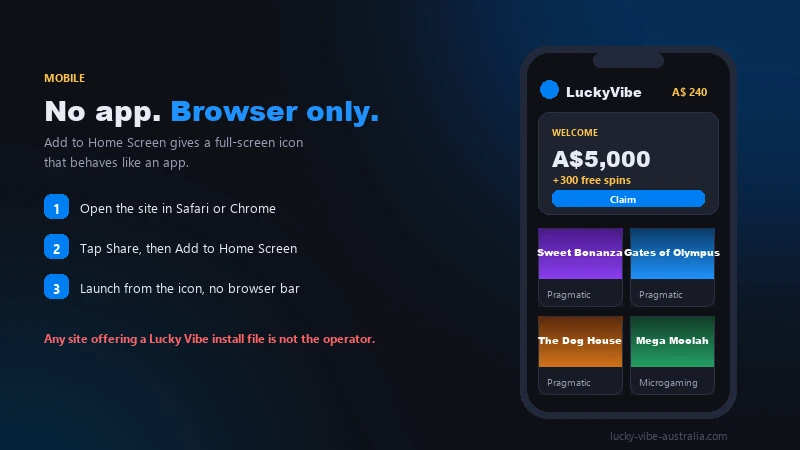
The pokies are the part that translates best. Every modern title from Pragmatic Play, Hacksaw, BGaming and Big Time Gaming ships as HTML5 with a portrait layout built in, so reels, paytables and bet controls resize instead of being squeezed. Browsing the pokies lobby and its provider filters is where you will notice the smaller screen most, because thumbnails stack into two columns and the filter menu hides behind an icon.
Live dealer content goes the other way. Evolution’s live blackjack and roulette tables are video streams, and on a phone they are the heaviest thing the casino will ask your connection to carry. Over a solid 5G or home Wi-Fi connection they hold up fine. On patchy mobile coverage the stream drops resolution first and stalls second, which is genuinely irritating mid-hand. Landscape mode helps with the side-bet buttons, which are small targets in portrait.
On the cashier, the phone is genuinely better than the desktop. PayID and Osko settle through your banking app, which lives on the same device, so the copy-paste round trip that takes three windows on a laptop takes two taps here. Deposits from A$20 clear in seconds, and the same convenience carries into withdrawals. The full rundown of PayID, cards, Neosurf and the crypto options for Australian players covers processing times method by method.
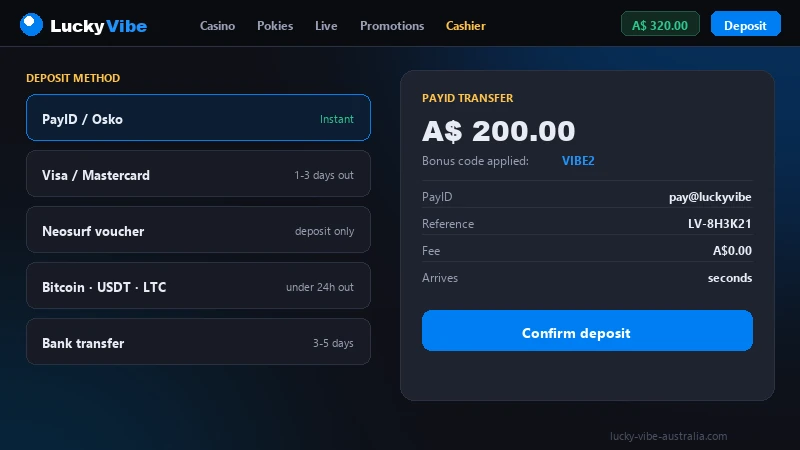
Account creation works on a phone without the usual friction: the form is short and the currency selector defaults sensibly for Australian traffic. The walkthrough on opening a Lucky Vibe account step by step flags the two fields people most often get wrong.
If the site does not open
On 15 July 2026 the ACMA asked Australian internet providers to block Lucky Vibe, one entry in a programme that has covered more than 1,700 sites since 2019. Where a provider has acted on that request, the domain simply fails to resolve, and what you get is what looks like a dead site rather than a block notice.
Two points matter here. The Interactive Gambling Act 2001 puts its obligations on the supplier, and the regulator’s own guidance says in as many words that Australian residents who access these services commit no offence. The flip side is that none of the consumer protections attached to Australian-licensed wagering apply to money you deposit here, so a dispute sits between you and a Curaçao licensee.
We do not publish workarounds for network-level blocks. What is useful to know is that the block sits at the provider level and not in your handset, so reinstalling a browser or hunting down an APK changes nothing about it. If your balance is stuck behind an unreachable site, the operator’s live chat and [email protected] are the channels that matter, and the general questions page covers what support can and cannot resolve.
Battery, data and storage
Mobile play is cheap on data right up until you sit at a live table. The figures below are typical ranges for casino traffic on a phone rather than published operator numbers, and they move with stream quality and how often you switch games.
Battery follows the same pattern. Pokies keep the screen on and the GPU lightly loaded, so an hour costs roughly what an hour of scrolling social media does. A live table decodes video continuously and drains a mid-range phone noticeably faster, especially at full brightness. Plan a long session at the tables and you will want a charger.
Storage is the easy one. The shortcut itself is a few kilobytes; what accumulates is the browser cache holding game assets, which can reach a few hundred megabytes after weeks of play. Clearing site data reclaims all of it and costs you nothing beyond a fresh login and slightly slower first loads.
Frequently asked questions
Is there a Lucky Vibe APK?
No. The operator publishes no Android package file, and there is no Lucky Vibe app download link anywhere on its site. Every file circulating under that name was built and hosted by someone else. Use the mobile browser and, if you want an icon on the home screen, the Add to Home Screen steps above.
Why can't I find Lucky Vibe in the App Store?
Apple only accepts real-money gaming apps from operators licensed in the territory where the app will be available. Australia does not issue online casino licences at all, so no offshore casino can meet that condition. Google Play applies an equivalent rule, so the whole Curaçao-licensed segment sits outside both stores.
Do I lose bonus progress if I switch between phone and desktop?
No. Wagering, free spin counts and the three-day bonus expiry are attached to your account, not to a device or a browser. You can start clearing the 40x requirement on a phone during your commute and finish on a laptop the same evening.
Can I withdraw with PayID from my phone?
Yes. The cashier is identical on mobile, and PayID withdrawals typically land the same day once your account is verified. Expect an extra 24 to 48 hours on your first withdrawal while KYC documents are checked, which is standard rather than a delay tactic.
Will the home-screen shortcut keep me logged in?
Usually yes, for as long as the session cookie survives. Clearing browsing data, using private mode or a long gap between visits will log you out, and the shortcut then opens the login screen instead of the lobby. Nothing about your balance changes when that happens.