
Lucky Vibe Casino Login — Access and Troubleshooting
Almost every failed Lucky Vibe Casino login comes down to one of five things: a mistyped email address, an account that was never confirmed, an expired session, a temporary lock after too many wrong attempts, or the site not resolving because an Australian internet provider is filtering the domain. All five have a fix, and none of them mean your balance has disappeared. Below is each one in the order Australian punters actually hit them.
One thing to set straight first: Lucky Vibe uses a single email-and-password login. No separate username, no member number, no app. If a page asks for a “member ID” before letting you in, you are not on the operator’s site.
Open your accountHow to log in
On desktop the login form sits behind the “Log in” button in the top right; on a phone it hides behind the burger menu. The flow underneath is identical either way.
On a desktop browser
- Open the casino in Chrome, Edge, Firefox or Safari and click Log in.
- Enter the email you registered with. Case does not matter for the email; it very much does for the password.
- Use the eye icon to reveal the password before you submit, so you are not guessing twice and burning attempts.
- A successful login drops you back in the pokies lobby with your A$ balance in the header. If the header still says “Log in” after the reload, the session did not stick, and that is a cookie problem covered in the table below.
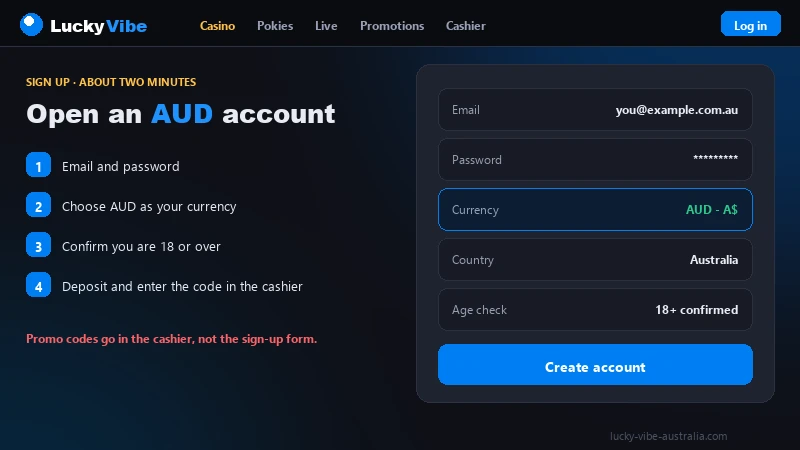
If you have never signed up, the form will keep rejecting you no matter how carefully you type. Start by opening a new account from Australia and confirming the email.
On a mobile browser
- Tap the burger icon and choose Log in.
- Let the browser’s saved-password prompt fill the fields instead of typing on a small keyboard.
- Watch the autocorrect trap: phone keyboards capitalise the first letter of an email address. Forms usually normalise that, but a stray capital in a password field is a genuine mismatch.
- Tap once and wait. Double-tapping fires two requests and can trip the attempt counter.
Forgot your password
Resetting is self-service and takes about two minutes, assuming the email actually lands.
- Open the login panel and tap Forgot password.
- Enter the exact address on the account. The system will not confirm whether that address exists, which is standard anti-enumeration behaviour, so “check your inbox” is not proof you typed it right.
- Follow the link in the email. These are single-use and time-limited.
- Set a new password, different from the old one. Some systems reject a straight reuse, and you lose the link doing it.
- Log in again. Other devices where you were signed in may be logged out.
When the reset email does not arrive
Here is the most common dead end, and it is rarely the casino’s doing. Work through these in order.
- Spam, Junk and Promotions. Gmail routinely files gambling mail under Promotions. Search the whole mailbox for “luckyvibe” instead of scrolling the inbox.
- Provider-level filtering. Some Australian ISP mailboxes and most corporate mail servers are aggressive with offshore gambling domains and drop the message before it reaches a folder you can see. Work addresses and old ISP-issued addresses are the usual culprits.
- A typo you cannot see. One wrong character at registration means the mail is being delivered, just not to you.
- The wrong address entirely. Plenty of players register with one mailbox and reset from another. Check the secondary one.
- Repeat requests cancel each other. Three resets in a row usually leaves only the newest link working, so use the last email in the thread and ignore the earlier ones.
If nothing arrives within about fifteen minutes, stop requesting and open a ticket from an address you can read. Changing the registered email counts as an account change, so expect to prove identity through the same document process described under KYC and AML checks.
The site will not load at all
Some Australian players find the domain does not resolve at all. There is no login page and no message from the site, just a browser error saying the page cannot be reached. That is neither an outage nor a problem with your account.
On 15 July 2026 the Australian Communications and Media Authority asked Australian internet providers to block the Lucky Vibe domain as part of its ongoing programme against offshore gambling sites. Providers act on those requests at their own pace, which is why the site can work on one connection and not another.
A provider-level block does not close your account, void a bonus or touch your balance. The account lives on the operator’s servers regardless of whether your connection reaches them. If you cannot get to the site and you have funds or an open cash-out, email [email protected], which is unaffected by a domain block. Our reaching a human at the casino page lists what to include so the first reply is useful. We will not publish ways around a regulator’s block, and any site that does is selling you something.
Lucky Vibe Casino login errors and what they mean
Those messages are deliberately vague, so they never leak which half of your credentials was wrong. Here is what each one usually means in practice.
| Symptom | Likely cause | What to do |
|---|---|---|
| “Invalid email or password” | Wrong password, wrong address, or caps lock. The wording is identical either way by design. | Reveal the password before submitting. After two careful failures, go to the reset flow instead of a third guess. |
| Login accepted, then a prompt to confirm your email | The account exists but the confirmation link was never opened. | Request a fresh confirmation email and open it on the same device. Deposits and bonuses stay locked until this is done. |
| Logged out mid-session, balance gone from the header | Session expired: common after a long idle spell, a switch from mobile data to Wi-Fi, or a browser restart. | Log in again. If it repeats every few minutes, your browser is discarding cookies; allow them for the site or drop strict tracking protection on it. |
| “Too many attempts, try again later” | Automatic rate limiting after several failed logins from one address. Temporary. | Wait fifteen to thirty minutes without further attempts, then reset the password rather than guessing again. |
| Page hangs on a spinner after you submit | A blocked script, an ad blocker or privacy extension interfering, or a partial page load. | Hard refresh, then retry in a private window with extensions off. If it only hangs in one browser, clear that browser’s site data. |
| Endless redirect loop between login and lobby | Stale or conflicting cookies, often after using a mirror link from a third party. | Clear cookies for the domain, close every tab of the site, reopen from your own bookmark and log in once. |
One pattern worth naming: if the loop or the hang started right after you clicked a link in an email or an ad, suspect the link before the casino.
Claim A$5,000 + 300 FSAccount locked or suspended
A lock behaves nothing like a failed login. You get in, or you get a message naming the account state, and then nothing works. Four realistic reasons.
- Verification not completed. Lucky Vibe leaves the document check until you cash out, so the first sizeable withdrawal is where most players run into this. Rejected or unreadable files leave the account in limbo until you resubmit.
- Suspected duplicate account. Two accounts on one household connection, or a second sign-up after a forgotten first, will be flagged. Say so honestly if it applies; hiding it makes the review longer.
- Self-exclusion or cooling-off. If you asked for a break, the lock is deliberate and generally cannot be lifted early. BetStop, the national register, covers Australian-licensed wagering operators, so an offshore casino handles exclusion at operator level only.
- Bonus terms breach. The welcome offer runs at 40x wagering on deposit plus bonus and expires after three days. Freezes here tend to follow irregular play patterns inside that window; the deadline on its own rarely triggers one.
Before writing in, gather what turns a two-week ticket into a two-day one: the registered email, roughly when you opened the account, a screenshot of the exact message, your last deposit amount and method, and clear photos of your ID plus a recent utility bill or bank statement in the same name and address. Send it from the registered address.
Do not open a second account to get around a lock. That is the fastest route from a temporary review to a permanent closure with the balance forfeited under the terms. If the lock is tied to a pending cash-out, our withdrawal times breakdown shows what counts as normal delay.
Keeping the account secure
This account holds real money and copies of your ID, and it sits outside the Australian complaints system. That combination makes the basics worth more here than on an account you could escalate locally.
- Use a password that exists nowhere else. Credential stuffing works because people reuse; an old forum leak is how most gambling accounts get taken over.
- Keep it in a password manager. A manager also refuses to autofill on a lookalike domain, which blocks phishing without you noticing.
- Prefer mobile data to public Wi-Fi at a pub, airport or shopping centre. HTTPS covers the traffic, but shared networks are where fake captive portals live.
- Never save the password on a device you do not own. A shared laptop keeps the session alive long after you walk away, so actually log out; closing the tab is not enough.
- The casino never asks for your password. A message asking you to “confirm your login details” is phishing every time.
How to tell a clone from the real thing
This brand attracts a swarm of copycat domains: near-identical names with an extra word, a different extension or a hyphen moved, all running a copied login form to harvest credentials. They rank on brand searches and buy ads, so arriving via search proves nothing.
Three checks, ten seconds. Read the full address in the bar; the padlock proves nothing, since any site at all can hold a certificate. Reach the casino from your own bookmark, never from a search result or a message someone sent you. And treat any page advertising a different welcome offer as suspect: clones routinely inflate the figures to A$8,000 or 500 free spins to look more generous than the real A$5,000 and 300 spins. The rest of the checklist sits under account security setup.
Lucky Vibe Casino login on a phone
Most Australian traffic here is mobile, and mobile means the browser. This brand ships no native app for iOS or Android and no APK, and there is nothing to install from a store. Anything offering a downloadable Lucky Vibe app is a wrapper at best.
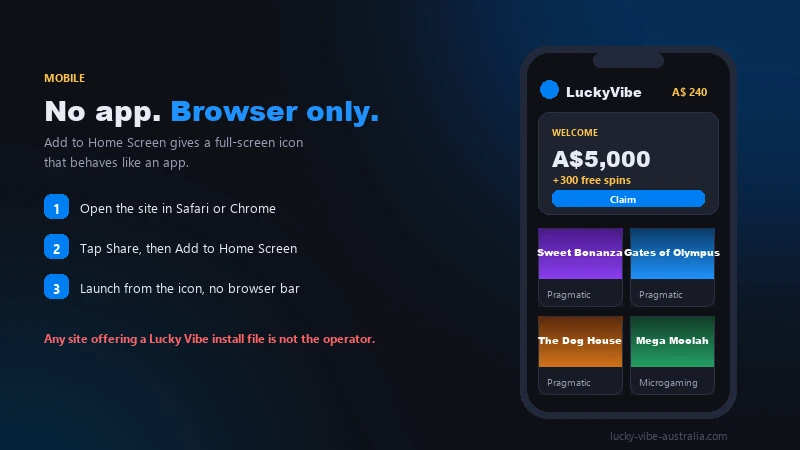
You can still make the site behave like one. On iPhone, open it in Safari, tap Share and choose Add to Home Screen. On Android, open it in Chrome, tap the three-dot menu and choose Add to Home screen. You get an icon that launches the lobby full screen. One catch: the address bar is also your clone check, so create the icon from the correct site.
Two mobile-specific notes. That biometric prompt at login is your phone unlocking its own password vault; it is no kind of two-factor authentication on the casino side, so treat it as a convenience and nothing more. And if the page renders oddly after an OS update, clear site data for the domain before assuming the casino broke something. More on mobile play without an app.
When to contact support
Use support early for anything touching account state, and skip it for anything you can fix in a browser. Cookies, extensions, autocorrect and cached data are your side of the line. Locks, failed verification, missing reset emails and anything touching a balance sit on theirs.
Two channels exist. Live chat runs 24/7 and is faster for straightforward questions. Email at [email protected] is the right choice for anything needing attachments, and the only channel that still works when the domain will not load on your connection. There is no phone line, so any number claiming to be Lucky Vibe telephone support is not the operator.
Put this in the first message: registered email, what happens versus what you expected, the exact error wording, device and browser version, whether it also fails in a private window and on another network, and the time in AEST. Screenshots beat descriptions. If money is involved, add the deposit amount and method, which ties back to the options under deposit methods.
Anything not specific to logging in is probably answered on the quick answers to account questions, and the wider picture of how this operator treats Australian players sits in our full Lucky Vibe Casino Australia review.
Log in and playFrequently asked questions
Why does my Lucky Vibe login work on mobile data but not on home Wi-Fi?
That pattern points to the ACMA-requested domain block; your account has nothing to do with it. Providers apply the block at different times and on different networks, so one connection resolves the domain and another does not. Your account, balance and any pending withdrawal are unaffected, and you can still reach the operator by email if something needs actioning.
I never received the confirmation email when I signed up. Can I still log in?
You can usually reach the form, but the account stays limited until the address is confirmed. Request a fresh confirmation email from the prompt, then search the whole mailbox, because gambling mail often lands in Promotions or Junk where the inbox will never show it. If two attempts produce nothing, the address on file probably has a typo and support will need to correct it.
How long does it take to unlock an account that is under verification?
Player reports put a straightforward review at roughly 24 to 48 hours once readable documents are in. Blurry photos, a name that does not match the payment method, or an address document older than three months restart the clock, so check your files carefully before you upload them.
Is it against the law for me to log in to Lucky Vibe from Australia?
No. Every obligation in the Interactive Gambling Act 2001 falls on the company running the site, and ACMA states that Australian residents who access these services do not commit an offence. The real downside sits elsewhere: the site holds no Australian licence, so the protections attached to an Australian-licensed wagering account do not cover deposits made here.
Can I stay logged in on more than one device?
Yes, a desktop and a phone session can run at once. Resetting your password typically ends the other sessions, and an idle session expires on its own. Do not leave one open on a device other people use, and end the session yourself before you walk away from it.